After spending 3.5 years under the name Looker Studio, Google is renaming its analytics tool. Data Studio is back, with a clear positioning and new goals towards the data cloud with artificial intelligence. Discover what this change means for users.
Highlights:
- Google will rename Looker Studio to Data Studio starting April 11, 2026; existing users do not need to take any action.
- This change provides strategic clarity: Data Studio is for personal exploration and ad hoc reports, while Looker is for enterprise Business Intelligence.
- Beyond the naming, Data Studio becomes a central hub for Google Data Cloud assets: reports, BigQuery chatbots, and Colab data applications.
- Two versions are available: a free version and a paid Pro version called the former Looker Studio Pro.
Return to the Beginning: Why Google Took a Step Back
On October 11, 2022, Google renamed Data Studio to Looker Studio; with the aim of consolidating the Business Intelligence portfolio under the Looker brand acquired in 2020. The purpose was clear: to position Looker as an enterprise BI platform and present Data Studio as its lightweight, self-service version.
It made sense in theory. In practice, however, the results were problematic.
The existence of two separate products sharing the same main name created confusion. Customers became unsure of which tool to choose. Sales and marketing teams struggled to explain the differences between Looker, Looker Studio, and Looker Studio Pro. A merger strategy that was consistent in the product schema had the opposite effect in the field.
Google did not explicitly state this in its announcement, but the word choices are striking: the Data Studio brand is described as “a beloved and well-known name” and “is being reintroduced”. This indirectly acknowledges that the renaming in 2022 was not beneficial for users.
Now a Readable Positioning
With the return to the original name, Google makes a clear distinction between the two analytics tools:
- Data Studio is focused on personal data exploration. It is a tool used to create ad hoc reports, quickly build interactive dashboards, and visualize data coming from the Google ecosystem: BigQuery, Google Sheets, Google Ads. It remains completely free for individual use.
- Looker continues to be the enterprise BI platform. It targets organizations that need managed data, centralized semantic models, and AI-based agency capabilities. Looker has also recently made significant investments in self-service and visualization features.
The clear distinction between these two products is actually more beneficial for customers than the previous schema; as sharing the same label between two tools at different levels was causing confusion.
What Will Happen to Data Studio in the Age of AI?
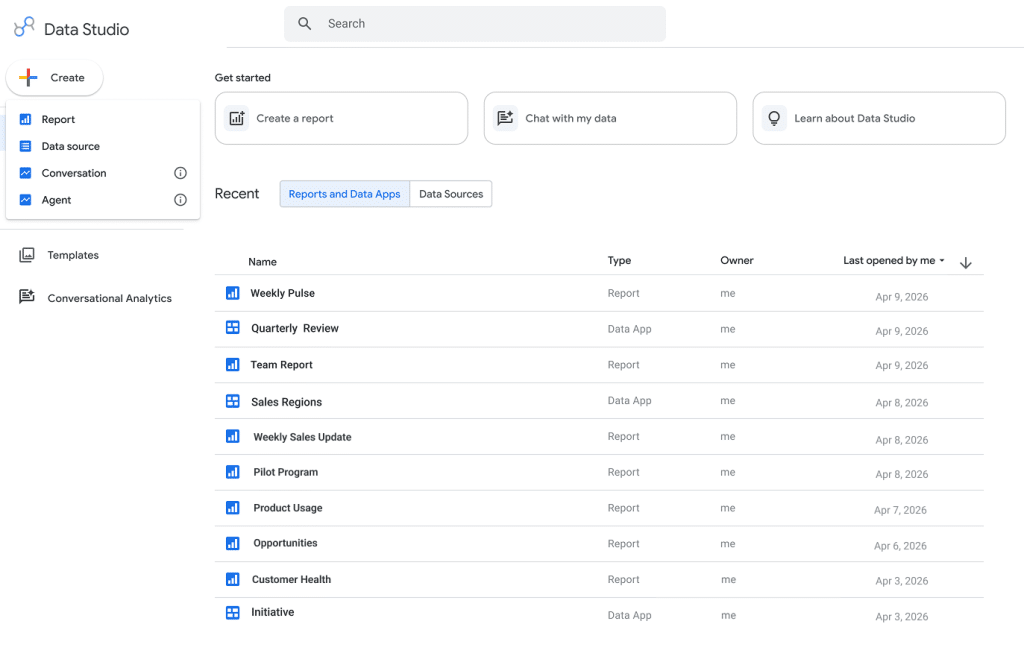
The renaming is not just a branding issue. Google is positioning Data Studio as a central hub for Google Data Cloud assets. Specifically, users will be able to access the following through a single interface:
- Classic Data Studio reports
- BigQuery chatbots
- Data applications created in Colab notebooks
This is a significant advancement compared to the old Looker Studio, which primarily focused on visualization. Google’s vision is to provide a single entry point to navigate the entire data ecosystem in an environment where AI is integrated into analytical workflows.
Google indicates that details of this roadmap will be presented at Google Cloud Next '26 later this month.
Two Versions: Free and Pro
The offering is organized at two levels:
- Data Studio (free): individual analysis, report and interactive dashboard creation, data sharing. It is a free entry point for anyone who wants to visualize their data within the Google ecosystem.
- Data Studio Pro (paid): the former Looker Studio Pro, this version is aimed at teams and organizations that need advanced features: enterprise-level security, management, compliance, AI capabilities, and deep integration with Google Cloud. Licenses can be purchased directly through the Google Cloud console or Google Workspace admin console.
For Existing Users: No Action Required
For everyone using Looker Studio daily, the central point is: the transition is seamless. All reports, data sources, assets, and existing users will automatically be migrated to the new Data Studio experience. No action is required.
The name change does not require rebuilding dashboards or restructuring links. Core functionality remains unchanged at this time; however, some developments in the interface are expected in the coming weeks and months.
Continuity is provided for professionals using the tool in the context of reporting. However, there is a question raised by many observers in the industry: “Will Looker’s vision of a central hub for data assets really become concrete features, or will it remain just a promise of a launch?”


































Comments
(10 Comments)