Google has published a series of practical guides (Playbooks) prepared by industry for the optimization of Google Business Profile (GBP) listings. A resource that should not be overlooked for those interested in local SEO.
Highlights:
- Google has released multiple GBP guides specific to industries such as restaurants, hotels, activities, and services, along with a general guide.
- These guides were sent directly to listing owners via email.
- A complete profile receives 7 times more clicks and 5 times more views than an incomplete profile.
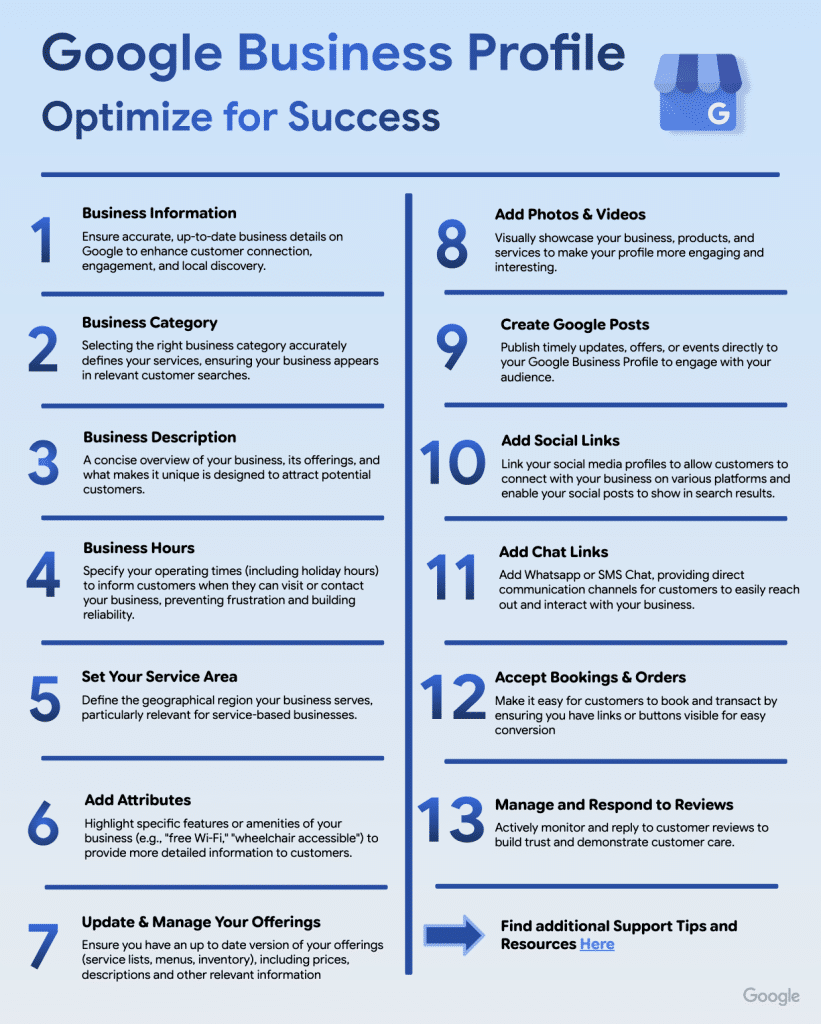
- General recommendations cover 13 optimization points, from business hours to reviews, and from posts to booking links.
Industry-Specific Official Guides
In early March 2026, Google sent an email to many listing owners announcing the release of new Google Business Profile guides. This information was shared by Glenn Gabe on Search Engine Roundtable; Daniel Hale reported the situation via LinkedIn.
These guides are available in PDF format and cover the following industries:
- Restaurants & Cafés
- Hotels & Accommodations
- Tour Operators & Activities
- Service Companies (plumbers, cleaning, etc.)
- General Guide for all other activities
Google also published an announcement on official GBP forums. If your business does not fit into one of the listed industries, the general guide contains universal best practices applicable to every listing.
Why Optimize GBP Listings: Google's Data
The general guide published by Google reminds us of the importance of optimizations with several data points from its internal data and the Google Economic Impact Report:
- Complete listings receive 7 times more clicks than incomplete listings.
- Regularly updated profiles provide 5 times more views.
- 29% of customers indicate they are more likely to shop from a business with a detailed profile.
- Throughout 2024, Google provided over 2 billion direct connections (search, referral, message, booking, review) for 19 million American businesses.

Recommended 13 Optimization Points
The general practical guide revolves around 13 concrete areas of action. Here are Google's recommendations:
1. Basic Information
Name, category, description, business hours: these four elements form the foundation of every listing. They directly affect your visibility on Google Search and Google Maps.
2. Activity Category
Google allows you to add up to 10 categories: one primary and nine secondary categories. The primary category defines the core of your business; secondary categories allow you to appear in more specific searches and expand your target audience.
3. Company Description
Google now offers a feature for AI-generated descriptions that can be accessed directly from the listing editing interface (Description Suggestion). The description can be edited before publication.
4. Business Hours
96% of customers indicate they are more likely to visit a business that displays its hours, and 91% search online before going. Google emphasizes the need to update extraordinary hours (holidays, special periods).
5. Service Area
Businesses that go to customers (tradespeople, home services) or those that combine physical storefronts with delivery can define 20 service areas. The suggested limit is approximately a 2-hour journey from the business's center.
6. Qualifications
Qualifications are used to highlight specific features: free Wi-Fi, wheelchair accessibility, terrace, pet acceptance, etc. This information is directly visible on Google Search and Maps, helping customers quickly find businesses that meet their criteria.
7. Offer Management
Menus, service lists, inventory: Google recommends keeping this information updated with descriptions and prices. 1 in 3 customers reviews a business's offerings.
8. Photos and Videos
The data is quite striking:
- 90% of people indicate they are more likely to visit a business with photos on Google.
- Businesses with photos receive 42% more requests for directions.
- They also record 35% more clicks to their websites.
9. Google Posts
Google recommends posting at least once a week and suggests using three types of posts in rotation: Updates, Events, and Offers. It advises including relevant keywords, a quality image, and a date. For example, after incorporating Google Posts into its strategy, Crate & Barrel saw a 31% increase in views on Google Maps and a 6% increase on Google Search.
50% of customers are looking for promotions or discounts when searching for a business online.
10. Social Media Links
It is possible to directly link Facebook, Instagram, X (Twitter), and YouTube to the listing. This allows social posts to appear in search results. Painting with a Twist saw a 9% increase in GBP views, 10% more website clicks, and phone calls, as well as 14% more users from Google after linking their social media accounts.
20% of customers check social media accounts before visiting a business.
11. Chat (WhatsApp & SMS)
Google allows adding a direct WhatsApp link or a phone number for SMS from the listing. 67% of people prefer sending a message to a business over calling or writing an email, and 60% state that WhatsApp is their favorite messaging channel for interacting with a business.
12. Reservations and Orders
Through the Reserve with Google program, customers can book appointments or place orders directly from the listing without being redirected to another site in over 88 countries. It is possible to add a special reservation link or an integrated reservation partner (creates a local Reservation button). 77% of consumers expect to make reservations for services online.
13. Review Management
91% of consumers use reviews to evaluate local businesses, and 65% are more likely to prefer a business that responds to their reviews. Google recommends responding to all reviews, whether positive or negative. Additionally, it is possible to create QR codes from the listing to encourage customers to leave reviews (which can appear on listings, menus, or storefronts).
Verification and Management of the Listing
The practical guide also addresses more technical points that are often overlooked:
- Verification of the listing is necessary to change information and interact with customers. Google offers five verification methods automatically assigned based on the business category. The verification process can take up to 5 business days.
- Adding multiple managers is strongly recommended to avoid being stuck in case an employee leaves. Only one primary owner is possible, but ownership can be transferred. Google recommends regularly checking the list of managers and keeping only authorized individuals listed here.
The guide also lists available support resources: help center, contact form, GBP community forum with Product Experts who can escalate complex issues directly to Google. Additionally, a table is provided for resolving common issues (suspension of the listing, fake reviews, lost access, wrong number, etc.).





















Comments
(8 Comments)